> ## Content Index
> Fetch the complete content index at: https://blog.addpipe.com/llms.txt
> Use this file to discover other available public pages before exploring further.
# Duration in WebM Videos Produced by Chrome
- URL: https://blog.addpipe.com/duration-in-webm-videos-produced-by-chrome/
- Published: 2026-05-29T06:40:12.000Z
- Updated: 2026-06-30T09:46:38.000Z
- Author: Octavian
- Tags: MediaStream Recording API
When [recording video in Chrome](https://addpipe.com/video-recorder/) using the [MediaStream Recording API](https://developer.mozilla.org/en-US/docs/Web/API/MediaStream%5FRecording%5FAPI), you now have 2 container options: WebM and MP4.
### **WebM**
WebM has been around since the MediaStream Recording API was rolled out in Chrome, and it is the default container unless you specify otherwise.
In a WebM file, there are 2 pieces of important metadata:
1. The `Info/Duration` element contains the recording's length.
2. The `Cues` section is an index that helps players quickly seek different parts of the video. Cues can indirectly help determine duration.
As we'll see, **some of this metadata is missing from WebM files produced by Chrome**.
The current MediaStream Recording API implementation in Chrome 148 can produce a WebM file in in 2 ways:
| Recording type | has Duration | has Cues |
| --------------------- | --------------------------------------------------------------------------------------- | -------- |
| non chunked recording | yes, [starting with Chrome 140](https://issues.chromium.org/issues/40482588#comment110) | no |
| chunked recording | no | no |
Starting [with Chrome 140, the Duration metadata is present in non chunked recordings](https://issues.chromium.org/issues/40482588#comment110). If you record longer videos - where chunking is needed/recommended - or make `requestData()` calls, the resulting WebM file will not have the `Duration` metadata. The `Cues` metadata is not present regardless if chunking/timeslice is used.
Having the `Duration` info but also a `Cues` section at the beginning of the WebM file is important. With them missing, several problems pop up:
1. The total duration of the recording is not immediately available.
2. Seeking ability is affected. Without the `Cues` section, seeking is still possible (assuming the player supports this), but requires reading all of the audio/video data up to the target location in order to find it.
3. You have to process the video again to obtain the duration and add it to the file.
In Chrome, when playing back such files, *seeking* and the *total length* are only available after the entire file is downloaded and parsed.
is a good tool to inspect WebM files. You can easily install it on macOS with `brew install mkvtoolnix` and run it with `mkvinfo input.webm`. Here's what it outputs with a non-chunked WebM file recorded in Chrome using our [MediaRecorder demo](https://addpipe.com/tech-demos/media-recorder-api-demo/).
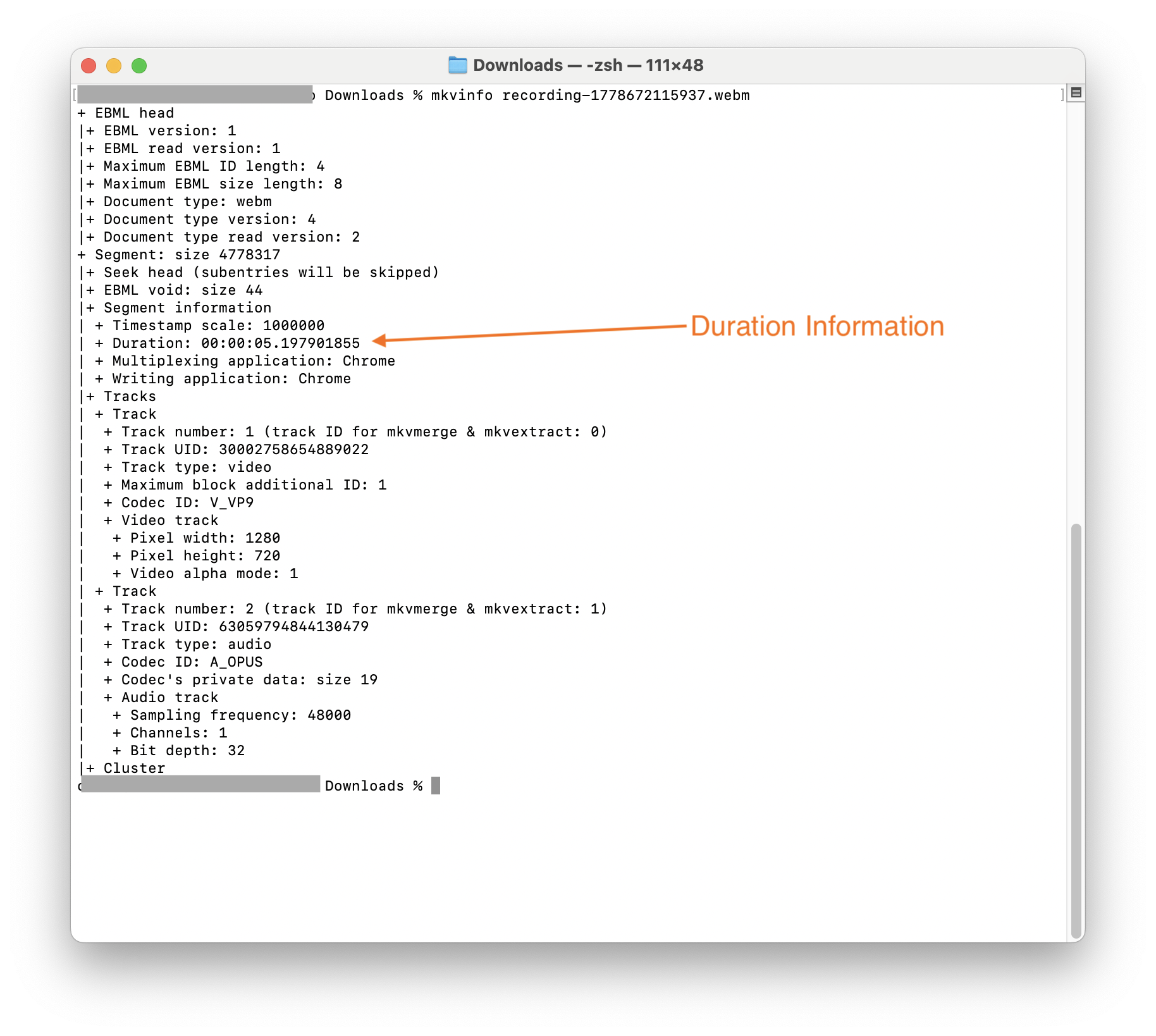
mkvinfo inspecting a WebM file created by Chrome that has a Duration element but no Cues element
There are several solutions to this **WebM duration issue**:
### Send the file to the server for further processing
This is what the [Pipe Video Recording Platform](https://addpipe.com/video-recorder/) has done for a long time. We use `ffmpeg` , `ffprobe`, and other tools to process it. There are several processing steps involved. At the end, we produce a standard (non-fragmented) MP4 with an MOOV atom at the beginning (fast-start) that contains proper duration metadata.
If you just want to fix the WebM file, the simplest way is to just remux the file — copy all streams without re-encoding:
`ffmpeg -i nocues.webm -c copy -cues_to_front 1 withcues.webm`
The `-c copy` remux is the standard fix for WebM files recorded via `MediaRecorder` in the browser. No quality loss since no decoding/re-encoding happens.
This only works for WebM files with VP8 or VP9 video, as `ffmpeg` will complain if you try to remux H.264 video into a WebM file:
```bash
[webm @ 0x820c29180] Only VP8 or VP9 or AV1 video and Vorbis or Opus audio and WebVTT subtitles are supported for WebM.
[out#0/webm @ 0x821058300] Could not write header (incorrect codec parameters ?): Invalid argument
Conversion failed!
```
`-cues_to_front 1` is particularly useful — it writes the `Cues` element **at the beginning** of the file rather than the end, which means players can use it for seeking without having to read to the end of the file first. [cues\_to\_front is documented here](https://ffmpeg.org/ffmpeg-formats.html#Options-28).
Separately, you could also try this [Node library](https://github.com/node-ebml/node-ebml) or its [TS counterpart](https://github.com/legokichi/ts-ebml).
### Rewrite the WebM recording in the browser
We've found several libraries that promise to do this
There are several open-source client-side libraries that attempt to solve the WebM duration issue client-side in the browser:
1. (based on ts-ebml; 2022 last release)
2. (based on ts-ebml; 2022 last release)
3. receives a custom duration as input, so it's a no-go for us since you have to measure it separately using JS, and it could be wrong if, for example, the JS thread locks while recording
The 1st two libraries above seem to rely on , which is a fork of .
We have not tested these libraries. If you do use them, I'd test for side effects like higher CPU/RAM usage or thread locking, measure processing times for various lengths/sizes, and check whether [they support files larger than 2GB](https://github.com/yusitnikov/fix-webm-duration/issues/26).
### Scan the WebM recording in the browser
The [webm-meta-lite](https://github.com/ainoya/webm-meta-lite) library can extract the duration, client-side, by scanning 3 parts of the video. The author has [an article explaining the mechanisms](https://ainoya.dev/posts/webm-missing-duration/). This is a good library if you just want to extract the duration and maybe save it to a database. It does not fix the file itself, and the duration data itself will not help you in other players.
### **Switch to MP4**
Switching to MP4 seemed like a viable alternative, but after further research, it appears [MP4 files created by Chrome/Safari also lack immediately available duration metadata](https://blog.addpipe.com/duration-in-mp4-files-produced-by-chrome-safari/) and must be further processed for correct playback across all players and delivery methods.