> ## Content Index
> Fetch the complete content index at: https://blog.addpipe.com/llms.txt
> Use this file to discover other available public pages before exploring further.
# Recording Audio in the Browser Using the MediaStream Recorder API
- URL: https://blog.addpipe.com/recording-audio-in-the-browser-using-pure-html5-and-minimal-javascript/
- Published: 2018-08-14T00:19:36.000Z
- Updated: 2026-05-21T08:21:48.000Z
- Author: Octavian
- Tags: Record Audio In HTML5, Technology, Tutorials, MediaStream Recording API, #Import 2026-05-22 13:18
*This is the 4th post in our new *[recording audio in HTML5](https://blog.addpipe.com/tag/record-audio-in-html5/)* series. We’ve previously covered how to record pcm audio using the JavaScript based [Recorder.js](https://blog.addpipe.com/using-recorder-js-to-capture-wav-audio-in-your-html5-web-site/), pcm, mp3 and Vorbis using [WebAudioRecorder.js](https://blog.addpipe.com/using-webaudiorecorder-js-to-record-audio-on-your-website/) and mp3 audio using the Web Assembly based [vmsg recorder](https://blog.addpipe.com/recording-mp3-audio-in-html5-using-vmsg-a-webassembly-library-based-on-lame/).*
We’re now going to take a look at native audio recording in the browser using the [MediaStream Recorder API](https://addpipe.com/media-recorder-api-demo/) – a [W3C](https://www.w3.org/) standard.
*As of this writing the MediaStream Recorder API spec is in [editor’s draft](https://w3c.github.io/mediacapture-record/)*.
What’s cool about the MediaStream Recorder API is that it is built-in browsers so your web app will **not make any extra HTTP requests** or **spend time loading external JS libraries**.
Another win is the number of code lines needed to set up a recorder. You can cook up a working audio recorder in as little as 21 lines of HTML & JavaScript. The CodePen is available [here](https://codepen.io/octavn/pen/GRgzqBg).
## Online Demo
We've also put together a better demo showing [how to use the MediaStream Recorder API to record audio](https://addpipe.com/media-recorder-api-demo-audio/) natively in the browser. [The code is on GitHub](https://github.com/addpipe/Media-Recorder-API-Demo-Audio).
## Browser Support
What’s not so cool is that on desktop computers it is only supported by:
- Chrome 52
- Firefox 30
- Opera 36
- Chrome 79
while on mobile it is only supported by:
- Chrome on Android
- Firefox on Android
This gives you about [75% coverage on desktop](https://netmarketshare.com/browser-market-share.aspx) (IE, Edge (non Chromium) and Safari do not support the standard) and [62% coverage on mobile](https://netmarketshare.com/browser-market-share.aspx?id=browsersMobile) (Safari on iOS does not support it).
On Safari we might have to wait until Safari 13/iOS13\. The API has NOT been announced for Safari 12/iOS 12 due later this year.
[This issue on bugs.webkit.org](https://bugs.webkit.org/show%5Fbug.cgi?id=85851) tracks the MediaRecorder API implementation in WebKit/Safari, if you need this API [jumping in and leaving a comment](https://bugs.webkit.org/show%5Fbug.cgi?id=85851#add%5Fcomment) will go a lot towards showing Apple developers we need this feature. On the other hand, WebKit is an open source project so anyone with mad skills can jump in and contribute.
~~On Edge the API is [*under consideration*](https://developer.microsoft.com/en-us/microsoft-edge/platform/status/mediarecorder/) for implementation with [967 votes.](https://wpdev.uservoice.com/forums/257854-microsoft-edge-developer/suggestions/6261360-media-recorder)~~ Edge 79 (Chromium) now supports the standard.
## Edge and Safari polyfill
On Safari 11 (on both macOS and iOS) and Edge (non Chromium) you can use this [neat polyfill](https://github.com/ai/audio-recorder-polyfill). It enables you to record uncompressed pcm audio in wav containers through the same MediaRecoder API.
This polyfill is cool because it enables you to record audio on most mobile devices – Chrome on Android and Safari on iOS – without relying on the limited [HTML Media Capture](https://addpipe.com/html-media-capture-demo/) standard. Go on and give the online [polyfill demo](https://ai.github.io/audio-recorder-polyfill/) a try on your iOS device, here’s what you’ll see:
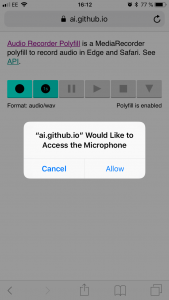
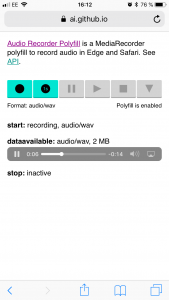
With the polyfill you’ll have about [83% coverage on desktop](https://netmarketshare.com/browser-market-share.aspx) (IE would still not be supported) and [90% coverage on mobile](https://netmarketshare.com/browser-market-share.aspx?id=browsersMobile) **when recording audio**.
## File formats, audio codecs & quality
**Chrome and Opera** will record mono channel Opus (default) and pcm (wav, uncompressed) audio at 48kHz in .webm (Matroska) containers.
**Firefox** will record mono Opus audio at 48kHz in .ogg containers (.webm is supported starting with Firefox 63). Firefox used Vorbis for audio recording in the 1st implementations but it moved to Opus since.
I’ve also noticed Firefox will record stereo audio (2 slightly different channels) when recording from a stereo capable recording device like the Logitech C925e or C920 (both have dual mics) or the 15″ Touch Bar MacBook PRO (3 mics).
In terms of controlling the bitrate, the [MediaRecorder API spec lists ](https://www.w3.org/TR/mediastream-recording/#dom-mediarecorder-audiobitspersecond)the `audioBitPerSecond` property but it is not supported at this time by any browser.
In terms of controlling the sample rate, one can specify it through the [sampleRate audio constraint in getUserMedia()](https://blog.addpipe.com/audio-constraints-getusermedia/) but it is not supported at this time by any browser.
**`MediaRecorder.isTypeSupported()`**
To check whether or not a browser supports a certain file format or audio codec when recording audio you can use the [MediaRecorder.isTypeSupported()](https://developer.mozilla.org/en-US/docs/Web/API/MediaRecorder/isTypeSupported) function. This function 1st appeared in [this article by Sam Dutton](https://developers.google.com/web/updates/2016/01/mediarecorder) and was later introduced in the [MediaRecorder API spec](http://www.w3.org/TR/mediastream-recording/).
Syntax:
```javascript
var canRecord = MediaRecorder.isTypeSupported(mimeType)
```
To test your browser, open its console and paste:
```javascript
//true on Chrome and Opera
MediaRecorder.isTypeSupported('audio/webm;codecs=opus')
//true on Firefox
MediaRecorder.isTypeSupported('audio/ogg;codecs=opus')
```
These are the MIME Types that you can pass to the [MediaRecorder constructor](https://www.w3.org/TR/mediastream-recording/#dom-mediarecorder-mediarecorder):
| BROWSER | CONTAINER | CODEC | MIME TYPES | CHANNELS |
| ------- | --------- | ----- | --------------------------------------------------- | -------------- |
| Firefox | .ogg | Opus | "audio/ogg; codecs=opus" | mono or stereo |
| Chrome | .webm | Opus | "audio/webm; codecs=opus", "audio/webm; codecs=pcm" | mono |
| Opera | .webm | Opus | "audio/webm; codecs=opus", "audio/webm; codecs=pcm" | mono |
**Length metadata**
It’s worth noting that Chrome produces a .webm file without any metadata about the duration of the recording. Such files, with no length information, will not be immediately seekable. The full discussion is in this [Chromium bug report](https://bugs.chromium.org/p/chromium/issues/detail?id=642012). Long story short the length metadata should be at the beginning of the file but the length info is not avb. when the 1st chunk is recorded. Firefox seems to have addressed the issue somehow.
**More about the MediaStream Recording API on our blog:**
- [HTML5’s Media Recorder API in Action on Chrome and Firefox](https://blog.addpipe.com/mediarecorder-api/)
- [Media Recorder API is Now Supported by 65% of all Desktop Internet Users](https://blog.addpipe.com/media-recorder-api-is-now-supported-by-65-of-all-desktop-internet-users/)
- [Media Recorder API Demo: Video Recording](https://addpipe.com/media-recorder-api-demo/)
- [Media Recorder API Demo: Audio Recording](https://addpipe.com/media-recorder-api-demo-audio/)
- [MediaStream Recorder API Now Available in Safari Technology Preview 73](https://blog.addpipe.com/safari-technology-preview-73-adds-limited-mediastream-recorder-api-support/)
**Further reading**
-
-
-
-