> ## Content Index
> Fetch the complete content index at: https://blog.addpipe.com/llms.txt
> Use this file to discover other available public pages before exploring further.
# Using Recorder.js to capture WAV audio in HTML5 and upload it to your server or download locally
- URL: https://blog.addpipe.com/using-recorder-js-to-capture-wav-audio-in-your-html5-web-site/
- Published: 2018-06-19T15:27:47.000Z
- Updated: 2026-05-21T08:22:40.000Z
- Author: Octavian
- Tags: Record Audio In HTML5, Technology, Tutorials, #Import 2026-05-22 13:18
*This is the 1st post in our new *[recording audio in HTML5](https://blog.addpipe.com/tag/record-audio-in-html5/)* series. Next, we’ll cover using [WebAudioRecorder](https://blog.addpipe.com/using-webaudiorecorder-js-to-record-audio-on-your-website/), [vmsg](https://blog.addpipe.com/recording-mp3-audio-in-html5-using-vmsg-a-webassembly-library-based-on-lame/), [opus-recorder](https://github.com/chris-rudmin/opus-recorder) and the [MediaStream Recording API](https://blog.addpipe.com/recording-audio-in-the-browser-using-pure-html5-and-minimal-javascript/).*
[Matt Diamond](https://github.com/mattdiamond)‘s [Recorder.js](https://github.com/mattdiamond/Recorderjs) is a popular JavaScript library for recording audio in the browser as uncompressed PCM audio in .wav containers. It is the 1st JS library to deal with audio recording in the browser – the [initial commit](https://github.com/mattdiamond/Recorderjs/commit/f24f616daa52cb0444f90296642ccf60f83a8d7c) is from September 2012, almost 6 years ago. Before, the only way was to use Flash.
When used with `getUserMedia()`, Recorder.js can record audio from a user’s microphone (or other input devices) directly on your website.
Despite its popularity – [the project has 2700+ stars on GitHub](https://github.com/mattdiamond/Recorderjs/stargazers) – the library is no longer maintained. In July 2016, Matt updated the repository to say that:
> This repository is not being actively maintained due to lack of time and interest.
That’s also in part because newer libraries, like [Web Audio Recorder](https://github.com/higuma/web-audio-recorder-js), [vmsg](https://github.com/Kagami/vmsg), and [opus-recorder](https://github.com/chris-rudmin/opus-recorder), although a lot bigger, can also convert the audio to MP3, Opus, or Vorbis.
Nevertheless, if you’re looking to record mono or 2-channel uncompressed PCM audio, Recorder.js is still a great choice. It's only 12.7KB (non-minified) and 3.2KB when gzipped, you’re spending only 1 HTTP call, and you can load it directly from the [Rawgit CDN](https://rawgit.com/) for production.
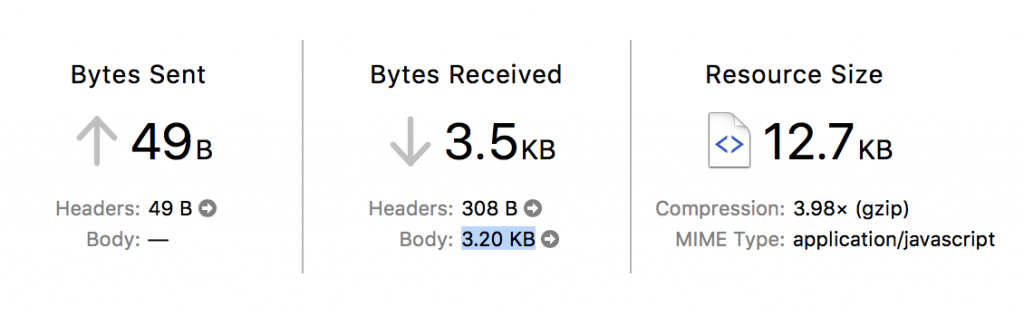
Recorder.js is smart in that it uses a Web Worker to assemble the .wav data, so it doesn't block the browser tab or make it unresponsive.
## Audio Quality
Recorder.js will record 16-bit mono/2-channel audio at the sample rate set in your OS for your playback device ([as per the spec](https://www.w3.org/TR/webaudio/#dom-audiocontextoptions-samplerate)). You’ll most commonly see 44.1 kHz and 48kHz audio recordings.
Despite what’s written in some tutorials I found, Recorder.js does not support MP3 encoding, only wav. It has a neat pause feature, though.
## Recorder.js in action
To get you started with Recorder.js we’ll build a simple demo that allows you to record a voice message in the browser but also pause & resume the recording process. Here’s the [live demo](https://addpipe.com/simple-recorderjs-demo/) and [GitHub project](https://github.com/addpipe/simple-recorderjs-demo).

Our simple demo will have the following files:
- `index.html` file to hold the UI
- `js/app.js` to hold the app code
- we’ll load `recorder.js` through Rawgit’s production URL `cdn.rawgit.com`.
Our `index.html` file is pretty straightforward:
```html
Simple Recorder.js demo with record, stop and pause
Recordings
```
Moving on to `app.js` we start by setting up a few variables, shims, getting references to our UI elements and adding event listeners:
```javascript
//webkitURL is deprecated but nevertheless
URL = window.URL || window.webkitURL;
var gumStream;
//stream from getUserMedia()
var rec;
//Recorder.js object
var input;
//MediaStreamAudioSourceNode we'll be recording
// shim for AudioContext when it's not avb.
var AudioContext = window.AudioContext || window.webkitAudioContext;
var audioContext = new AudioContext;
//new audio context to help us record
var recordButton = document.getElementById("recordButton");
var stopButton = document.getElementById("stopButton");
var pauseButton = document.getElementById("pauseButton");
//add events to those 3 buttons
recordButton.addEventListener("click", startRecording);
stopButton.addEventListener("click", stopRecording);
pauseButton.addEventListener("click", pauseRecording);
```
The code is then split between 4 important functions:
- `startRecording()`
- `stopRecording()`
- `pauseRecording()`
- `createDownloadLink(blob)`
`startRecording()` launches the promise based `getUserMedia()` and on success it passes the audio stream to an AudioContext which is then passed to our `Recorder.js` object. The actual recording process is triggered by `rec.record()`. We’re passing `numChannels:1` to force mono sound. Omit the property or set it to 2 to record 2 channel sound. Uncompressed 2 channel audio will take twice as much space/memory as mono.
```javascript
function startRecording() { console.log("recordButton clicked"); }
```
```javascript
/* Simple constraints object, for more advanced audio features see
https://addpipe.com/blog/audio-constraints-getusermedia/ */
var constraints = {
audio: true,
video: false
}
/* Disable the record button until we get a success or fail from getUserMedia() */
recordButton.disabled = true;
stopButton.disabled = false;
pauseButton.disabled = false
/* We're using the standard promise based getUserMedia()
https://developer.mozilla.org/en-US/docs/Web/API/MediaDevices/getUserMedia */
navigator.mediaDevices.getUserMedia(constraints).then(function(stream) {
console.log("getUserMedia() success, stream created, initializing Recorder.js ...");
/* assign to gumStream for later use */
gumStream = stream;
/* use the stream */
input = audioContext.createMediaStreamSource(stream);
/* Create the Recorder object and configure to record mono sound (1 channel) Recording 2 channels will double the file size */
rec = new Recorder(input, {
numChannels: 1
})
//start the recording process
rec.record()
console.log("Recording started");
}).catch(function(err) {
//enable the record button if getUserMedia() fails
recordButton.disabled = false;
stopButton.disabled = true;
pauseButton.disabled = true
});
}
```
`pauseRecording()` is pretty straightforward, it uses `rec.recording` to determine whether or not a recording is in progress.
```javascript
function pauseRecording() {
console.log("pauseButton clicked rec.recording=", rec.recording);
if (rec.recording) {
//pause
rec.stop();
pauseButton.innerHTML = "Resume";
} else {
//resume
rec.record()
pauseButton.innerHTML = "Pause";
}
}
```
`stopRecording()` stops the recording process, stops the mic access, triggers the wav export, and enables the Record button to allow for subsequent recordings.
```javascript
function stopRecording() {
console.log("stopButton clicked");
//disable the stop button, enable the record too allow for new recordings
stopButton.disabled = true;
recordButton.disabled = false;
pauseButton.disabled = true;
//reset button just in case the recording is stopped while paused
pauseButton.innerHTML = "Pause";
//tell the recorder to stop the recording
rec.stop(); //stop microphone access
gumStream.getAudioTracks()[0].stop();
//create the wav blob and pass it on to createDownloadLink
rec.exportWAV(createDownloadLink);
}
```
When the wav export process is complete `createDownloadLink(blob)` is called and receives the wav audio data as a blob. It creates an `