A Quick Look at Apple's SpeechAnalyzer API
Apple introduced SpeechAnalyzer, a new speech-to-text API and technology in 2025 for it's 26 suite of OSs (iOS26, macOS26, etc.), replacing SFSpeechRecognizer introduced in iOS 10. According to Apple, SpeechAnalyzer is faster, more flexible, and supports long-form and distant audio which makes it suitable for lectures, meetings, and conversations. The new API is already powering system apps like Notes, Voice Memos, and Journal.
We looked into it to understand whether it's something we can use in browsers like Safari and Chrome on these platforms. Here's what we found.
It Runs Fully Offline
SpeechAnalyzer and its SpeechTranscriber module run entirely on the device, using a new Apple speech model that gets downloaded and managed by the system. There's no network call anywhere in the transcription path (as it might happen with the older SFSpeechRecognizer). Running it exclusively on the device means it is fast and private.
Performant
Performance wise, we found several community benchmarks which position it as a top model for transcribing English:
- Recent accuracy & speed tests (1, 2) place it in top 3 for English and about 3x faster than Whisper Small
- In a June 2025 speed test it was 2.2 times faster than using Whisper's Large V3 model
Supported Languages
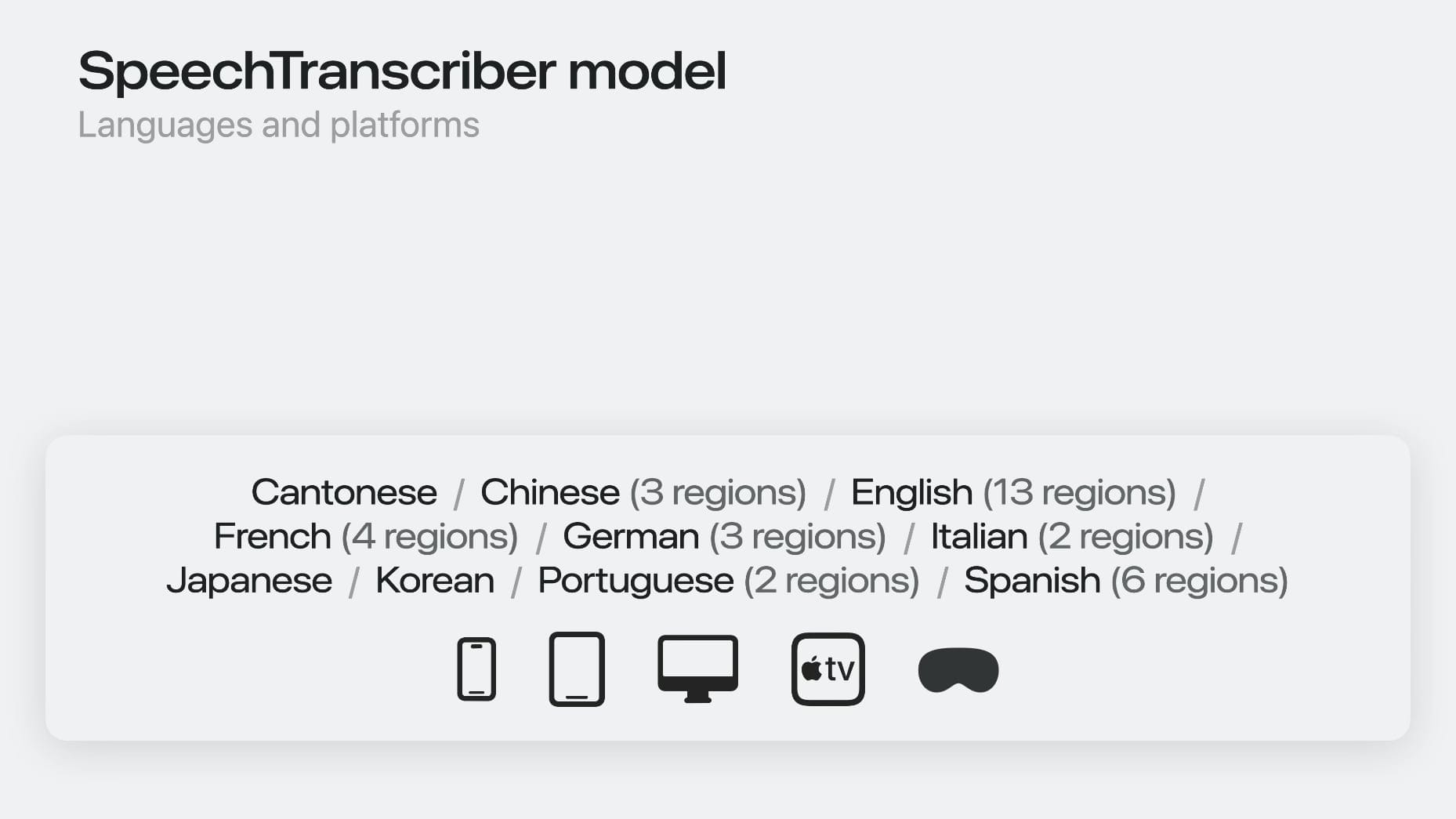
At launch, it supported Cantonese, Chinese, English, French, German, Italian, Japanese, Korean, Portuguese and Spanish.
Unsupported Languages & Devices
If you need an unsupported language or device, Apple also offers a second transcriber class: DictationTranscriber. It supports the same languages, speech-to-text model, and devices as iOS 10’s on-device SFSpeechRecognizer but improving on SFSpeechRecognizer, you will NOT need to tell your users to go into Settings and turn on Siri or keyboard dictation for any particular language.
Platform Coverage
SpeechAnalyzer ships in iOS 26, iPadOS 26, macOS 26, tvOS 26, visionOS 26 and Mac Catalyst 26. The one Apple platform that does not have it is watchOS.
The older SFSpeechRecognizer is available since iOS 10, iPadOS 10, Mac Catalyst 10, macOS 10.15 and visionOS 1.0.
Command Line Usage
On macOS 26+, you can use it through yap, a simple command line utility that takes any source as input (audio and video files, the live system audio, microphone) and outputs SRT, JSON, VTT and TXT transcripts by harnessing SpeechAnalyzer.
No JavaScript Binding
Unfortunately, there's no JavaScript binding and no browser exposure of any kind. It seems the only way to reach the new model from JavaScript is to build a bridge yourself, wrapping the native SpeechAnalyzer Swift API in a native module and calling it from a JS runtime running on the device, something like React Native. Callstack published a writeup doing exactly that, bridging SpeechAnalyzer into JS through a native module. But that's a bridge someone has to build and maintain, not SpeechAnalyzer running in JS on its own.
Safari's SpeechRecognition Relies on The Older SFSpeechRecognizer ?
Safari's Web Speech API exposes SpeechRecognition as webkitSpeechRecognition, and it has existed since Safari 14.1 on macOS and 14.5 on iOS and iPadOS, well before SpeechAnalyzer existed.
Safari's implementation of the WebSpeech API's SpeechRecognition interface - that we covered previously and for which we have an extensive demo here - still seems to use the older model. From our experience, on macOS 26, Safari:
- Prompts you about sending data to Apple
- Transcription does not work offline (with WiFi turned OFF)
- English transcription accuracy could be better
So the two are separate systems entirely. webkitSpeechRecognition still works in Safari, but it doesn't give you SpeechAnalyzer's model or its offline guarantee, and SpeechAnalyzer has no Web Speech API surface of its own.
We'd love to get access to SpeechAnalyzer from Safari because it is designed for long form, conversational audio from the ground up while SFSpeechRecognizer was built for short commands with strict duration limits.
References:
- WWDC25 Video: Bring advanced speech-to-text to your app with SpeechAnalyzer
- Apple's New Speech Framework: SpeechAnalyzer vs SFSpeechRecognizer
- Hands-On: How Apple’s New Speech APIs Outpace Whisper for Lightning-Fast Transcription
- yap - A CLI for on-device speech transcription
- Apple's New Speech API vs Whisper: The First Real Benchmark
- Parakeet vs Apple's Speech API vs MOSS: Benchmark Round 2
- Apple SpeechAnalyzer and Argmax WhisperKit
- iOS 26: SpeechAnalyzer Guide
